The 4 People You Meet After Adding Online Chat on Your Prestashop Store

Adding live chat to your Prestashop web store will expose you to different kinds of people and rightly so! The purpose of a free live chat is to make you available to your online shoppers at no cost.

Your Prestashop site is not a lone store sitting on top of a hill. It’s situated in a very busy virtual marketplace in a virtual downtown spotted with millions of other shops. You wouldn’t leave your shop open without somebody behind the counter, wouldn’t you?

When you start engaging with people using the live help widget you’ve added (thanks to the free Offerchat live chat module created by the very awesome jeckyl) you’ll sense some of them have somewhat similar habits. And you know what, you’re right!

Truth is there at least 4 kinds of online shoppers out there in the virtual wild. Knowing them and spotting their inherent habits during a chat conversation will give you the upper-hand on how to appeal to them and induce a sale.

The 4 People You Meet in Live Chat

People who use the free live chat module on your Prestashop store are not the typical online shoppers. Most of them are busy professionals who greatly value their time and seek an efficient service. They have a higher buying power, shop more frequently online and spend more.

That’s why they’re most comfortable having online chat with you and getting information straight through live chat.

However, this group of people has their shopping quirks and habits too. They largely differ in their personalities and shopping style.

Online chat on webstore

The Yapper

Habits/Attitudes: Very friendly and familiar, very comfortable with chatting. Expect the conversation to last longer than a usual “hello-thanks-bye”. They love to ask a lot and going into minute details about their inquiry or their experience.

Your Action Plan: Yappers are probably the most familiar and the most comfortable with online shopping. They take their time and they’re not in a hurry. They could be just curious shoppers just doing some window shopping or they could be very smart researchers with the intent to purchase.

The smart merchant will seek to identify which is which and jump at the opportunity of making a sale. That said, be alert at spotting expressions or words that show “urgent intent”.

For example, when a customer chats thus, “I’m looking for a waterproof camera I can use for my coming trip”, reply immediately with the link to all your available waterproof cameras. Demonstrate product knowledge and do some price comparisons, advantages and perks and other pre-sales strategic communications. It avoids the chat session to trail off too long and puts the focus back to the main business as yappers have the huge tendency to blab away not minding the time.

The Click and Mortar

Habits/Attitudes: The click and mortar type arrives at your Prestashop, looks around, then asks if you have an actual store down the street. They only shop online for research and prefer to see the merchandise before opening their wallets.

Your Action Plan: If you’re using actual photos, explain and emphasize in your live chat conversation that the images on your web store are actual photographs of the items. WYSIWYG. What you see is what you get. That said, use high-resolution images for each product item.

Useful Tip: If you’re using Offerchat, the active chat window displays what page the visitor is in. If the visitor is on a product page, use it as an example. Have the visitor click the images to enlarge them and so they can appreciate the items.

The Showroomer

Online chat on site with showrooming shopper

Habits/Attitudes: The exact opposite of the click and mortar. These types are the sons and daughters of the mobile era, the phone/tablet/phablet-toting bargain hunters. They go inside a real-world store, examine an item, and run a search online through their mobile device to look for sweet deals, discounts and other offers.

Your Action Plan: Be ready for bargain, promo and shipping inquiries and put your best foot forward. Highlight the perks of your business. Reply in a concise and timely manner. These people are most probably chatting from a mobile device and they’re most probably on the go. The intent of purchase is already very strong and present so don’t let it dwindle by delayed chat replies.

The Shopping Cart Deserter

Habits/Attitudes: They don’t talk much but stays for a long time browsing your store. Add items to cart, but not completing the full purchase. These types drop out at the checkout counter and leave without buying anything. These people have shown interest in your items for sale, but they don’t complete the purchase for many reasons. It could be fears about credit card security and delivery rates. It could be they’re just doing research and building a wish list. Or it can be as simple as being on a tight budget.
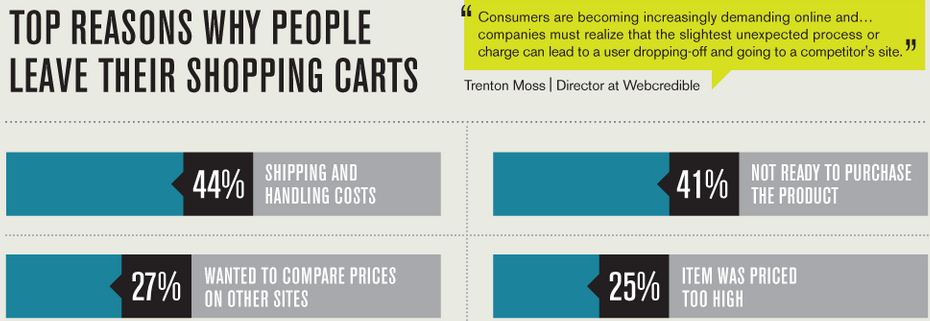
Why People Abandon Carts

Source: Kissmetrics

Your Action Plan: When you see these types lingering around the checkout page or any part of your site for a long time, be proactive and offer help by chatting with that visitor. Direct them to your FAQ section to abate their fears about the security of online transactions and your shipping rates policies.

Through the Offerchat dashboard you will know how long a visitor is on a page. Click a visitor who have stayed long enough and initiate a chat right away. Offer your help. Let them know if there are special offers for the products/items they are viewing, especially delivery specials or discounts . Be proactive! A good idea is to set up chat triggers for these types of shoppers.

Tell us about the people you meet

Did we miss a special group of shopper?

I’m sure you’ll meet special cases as you spend more time online through the Offerchat live chat app on your Prestashop site. In time, you’ll notice a certain pattern of shopper behaviors that is why it is essential to know what the Offerchat online chat on your site can do so that you can effectively engage with the visiting online shoppers on your site.

And if you feel that a certain feature will help you a lot, tell us about it! We built Offerchat based on user feedback and it’s good to know your experiences as a business owner and Prestashop vendor so we can design features that will suit you best.

Happy chatting and sell more!

Published by

Cheby Labrague
Cheby Labrague

Cheby writes about live chat insights, improving conversions, epic customer service, online marketing and everything in between. She will take you by the hand in exploring how to extend your website's earning power through Offerchat's smart live chat tool, and even smarter live chat people.

Related Posts

If you enjoyed this topic, you might also like:


Can a Free Live Chat App Save the Earth?

Last Monday, April 22, the world celebrated Earth Day 2013. The focus for this event is climate change and entailed each and every single one of us to take a look at our carbon footprint especially that of our daily activities. A carbon footprint is the total sets of greenhouse gas (GHG) emissions caused by an organization, event, activity, product, or person.

At Offerchat, this activity allowed us to think about our project in relation to the environment.

Did you know that the simple use of a live chat app on your site can reduce your carbon footprint and save the Earth? We didn’t. And we we’re surprised by what we found out and what we realized.

How a Free Live Chat App Can Help Save Our Planet

A live chat app is a web-based tool that can be embedded on any website. Once added, it provides a feature for site visitors to communicate one-on-one with the website’s owner, admin or a customer support rep online – all these without leaving the page or using another medium such as email.

The live chat feature is perfect for general inquiries (item, price, shipping, etc.) and first-level support. It’s the best-suited instant communication tool for business and E-commerce websites where online shoppers are keen on asking for instant information of which they base their purchase decisions.

Below are specific ways a live chat tool can reduce the carbon footprint of an organization, company, or a solo enterprise engaged in E-commerce and online retail:

Live chat app decreases phone calls

A very large percentage of the incoming call traffic that contact centers receive is general inquiries. For online merchants selling products and/or services, the amount of pre-sales inquiries can be astounding.

Many E-commerce sites have contact numbers. A single mobile phone call is believed to have a carbon footprint of 47kg of carbon dioxide a year for a typical two-minute usage per day.

Having a live chat app on your site presents online shoppers with a more attractive option than grabbing their phones to reach you. If all your site visitors won’t have to make a phone to inquire about your items for sale, you’re definitely helping in reducing the carbon footprint of phone calls in the world.

Free live chat tool minimizes outsourcing to high-energy call centers

A business with its own live chat tool minimizes the need for too many high-energy contact centers.

The facilities, equipment, manpower and maintenance of high-energy contact centers have contributed much to carbon emissions. A phone support agent can attend to only one customer at a time, while a live chat person can attend to a maximum of three customers.

Just look at this call volume data for December 2012 from the 311 contact center:

Percentage of General Inquiries Calls Vs Service Request Source


The data shows the large majority of the incoming call traffic at 311 is general inquiries by nature. This accounts for a bulk of the calls being handled by their customer service representatives.

Imagine if this high-energy call center has live chat agents handling general inquiries instead of phone agents. Certainly, their carbon footprint can be hugely decreased as telecommunications networks, equipment cooling devices, PCs, computing devices and other facilities are reduced.

Live chat is web based

A web based live chat tool eliminates the use of multiple PCs.

The conventional idea of “software” is a licensed executable file to be downloaded and installed in a single device. This implies that said software can be accessed and run only in a single computer bearing the license and not with a different one. More users would mean more devices, and consequently, more money and energy spent.

Current web based live chat applications operate in no such conditions. Since they are cloud-hosted, a user need not download and install software but rather just add a line of code to the HTML framework of his or her website.

Since they’re not limited to function on a single machine, the dashboard of any web-based online chat software can be accessed through any device (PC, laptop, smartphone or tablet) with an internet connection and a browser. So it rules out the use of multiple devices especially in online enterprises where it is used for live help.

Live chat encourages work from home jobs

Outsourcing and crowdsourcing are two very loud industry buzzwords nowadays. Remote workforce lies at the core of these concepts and a lot of them are qualified for live chat support.

The latest TeamViewer Study: Remote Workers Work Harder for the Environment reveals that telecommuting employees are more likely to consume less energy, thereby, reducing carbon emissions and saving the planet.

Instead of having your live chat support teams in-house, in a high-energy contact center, delegating it to the remote workforce is a move that can positively impact the planet and help alleviate climate change. Just imagine if a significant amount of first-level support agents work from home instead in call centers.

Parting Words:

Free Live Chat Saves the Environment

Incorporating ways to reduce global warming to heal the Earth should be at the fabric of our business culture. You can start it right at your own venture to contribute to the growing number of Earth savers.

There are numerous ways to this: From practicing energy conservation at the office, to practicing the 3 R’s (reduce, reuse and recycle), to allowing workers to telecommute, to re-thinking and finding ways to free ourselves from high-energy contact centers and many other creative ways.

Help minimize phone calls and add live help to your site! Saving the planet means saving ourselves.

Published by

Cheby Labrague
Cheby Labrague

Cheby writes about live chat insights, improving conversions, epic customer service, online marketing and everything in between. She will take you by the hand in exploring how to extend your website's earning power through Offerchat's smart live chat tool, and even smarter live chat people.

Related Posts

If you enjoyed this topic, you might also like:


How NOT to Stress About Outsourcing Customer Service and Sit Back Like a Boss

Outsourcing customer service is adapted by 12% of U.S. companies. Due to our seemingly infinite interconnectivity, outsourcing of work globally came as a result. It is not uncommon for a company or an entrepreneur today to have workers outsourced (most of them off-shore), in fact, it is considered a necessity for various reasons although sentiments largely differ. Statistics shows that a total of 2,273,392 U.S. jobs were outsourced in 2011.

outsourcing to the world

But, why the stress?

While customer serving outsourcing takes a tremendous load off a business owner’s shoulders, for some, it seems only to be replaced by a different bag of burdens such as remote and/or timezone coordination. Consumers spouted backlash regarding ineffective communication due to language and cultural barriers.

Many also view outsourcing customer service is the quickest way to bankruptcy due to low-quality work done by “human cronjobs”, limited ability of outsourced workers to do creative and abstract thinking, and alleged outsource agencies’ malicious tricks in the trade.

Long story short, outsourcing = bad idea = loss

Are you constantly looking over your shoulders, worried that you have made or will be making the wrong decision? Read on…

Warding Off Stress from Outsourcing Any Kind of Customer Service Effectively

Why do some companies and small businesses report outsourcing success? Why do others quit because of failure?

The difference lies between their view about outsourcing, their business process, the research they’ve done, and the keeping in touch with their outsourcing agency.

Think: “We don’t outsource. Rather, we recruit globally.”

The word here is “recruit”.

More often than not, the actual reasons one has in mind when outsourcing work usually determine its success or failure. Goes the same for outsourcing customer service, specifically, live chat support.

One has to have the right reasons for outsourcing. The ideal reason is: You have more valuable things to do.

Outsourcing customer service strategy

If your sole reason is to pay cheap labor or to cut costs, the resulting mindset is “I’m moving workloads from expensive to cheap workers”. Most likely you’ll get human cronjobs along with the dark side of outsourcing.

On the other hand, if you’re thinking along the lines of: “I’m going to chase and recruit talent where I can find it, and if I can find top-tier talent in (insert lower salary arbitrage country here), I’ll prefer to hire it there”, you can actually get out high-quality work.

Which of the two you think would lead to success?

Have a clear process in place

Managers need to understand that outsourcing (whether on-shore or off-shore) doesn’t replace proper and good process.

So let me ask you from the get-go: have you specified a process for your outsourced workforce? Do you have one in mind before you partner with an outsourcing agency?

A proper and good process right from the start is the foundation for the success of outsourcing your customer service.

The onboarding session is the “big”, if not the single opportunity, for you to specify how the task you’re outsourcing should be done, what your expectations are, the results you want, additional skills you (might) need from an outsourced worker (if any), your business policies, feedback procedures, key performance indicators, and other essential information that you consider will give you the maximum results and satisfaction.

Research, research, and compare

How to hire the right outsourcing

Going around for an outsourcing company is a bit like shopping. Too often, majority of us consumers would readily go for the lowest prices only to be disappointed in the end.

I’m sure you as a business owner and as a manager have now realized that it’s hardly about the price, else fine dining will never make a single dime. You know better!

When doing your research, there is at least one entity you’ll have to deal with – the freelancer you’re going to outsource work to, or the agency.

For many entrepreneurs, hiring an individual vs an agency is mostly the first decision they have to make. Whether you choose one over the other, the consequent research to be done is quite similar.

Whether you’ll be getting an individual or an outsourcing agency for your business, always remember to NEVER skip vetting the competency of applicants. Look for solid evidence that could back their “maximum satisfaction” claims, among other things to keep in mind.

And just like canvassing or shopping, it would be best to have a checklist in hand!

To Sum It All Up...

The confidence and the peace of mind that comes after making a business decision, be it having a free live chat feature for your Ecommerce site or hire a customer chat service, can only result from a careful, thorough research and comparisons, having a clear process in place, and having the right mindset about outsourcing.

Published by

Cheby Labrague
Cheby Labrague

Cheby writes about live chat insights, improving conversions, epic customer service, online marketing and everything in between. She will take you by the hand in exploring how to extend your website's earning power through Offerchat's smart live chat tool, and even smarter live chat people.

Related Posts

If you enjoyed this topic, you might also like:


National Public Health Week Reflection: Your “Means to a Living” Could be Killing You, Here’s Why

The National Public Health Week 2013 theme got it spot on: “Public health is Return on Investment: Save Lives, Save Money.” Workers’ health is crucial to the industry and to the economy. Personally, our health is what keeps our business/jobs is what keeps us earning. We have to take care of it. Our business, our companies, our jobs -- what brings food to the table -- might be our very killers. Shocker, isn’t it?

The Silent Killer

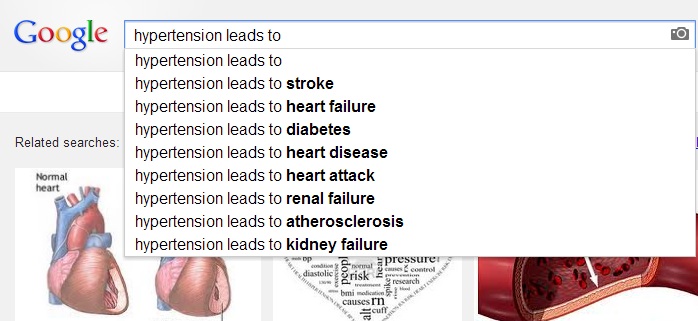
This year’s World Health Day’s focus is today’s “silent killer”, and that is, hypertension or high blood pressure. The disease is killing more people than any of the most horrible accidents or diseases most of us greatly fear.

Hypertension leads to

The overwhelming epidemic of hypertension is directly caused by our modern lifestyle characterized by too little exercise, too much reliance on fast food, and high levels of stress at work.

Alarmingly, more young people are falling prey to hypertension. According to the latest reports of the World Health Organisation (WHO), high blood pressure is now striking at an earlier age, affecting people in their 20s and 30s worldwide. Triggers to the disease often start at an earlier age, which only shows our lifestyle is silently killing us.

Why Your Own Business or Job is Killing You

national public health week business kills

Tough competition in the industry

The prevailing attitude in our modern times is hard work and competition. We sit in our desks and get bombarded by orders, deadlines and naggers. We are overwhelmed with “getting in the game” to survive another day in the tough arena of marketing, selling and promoting the business or our individual projects, getting ahead or staying ahead, consuming information and executing strategies, and all that.

Growth as the goal

We struggle to beat the competition and be the champion in this rat race to get the upper hand in the market share. Consequently, we perceive that to translate into business success, profit and revenue, and ultimately, growth. In turn, growth will pose new (and more) challenges in the list -- which means, added stress to a business owner and the team.

The everyday grind

The daily grind of doing your job or running the business, keeping your head above the water is enough to accelerate your stress levels to breaking point. Everybody’s on to doing getting the job better. Managements are constantly on the lookout for methods to do business more efficiently and more effectively. This then trickles down to operations and the workforce. The grind to do things better is positive, however, just like with other things, drive also brings along with it friction. You might not be aware of it, thinking it’s but natural, however, your body and well-being is already suffering.

Think wear and tear. Happens to us all, even to the best of us.

Stress is real.

We’re already past the years wherein it’s considered as illusions of the mind, a case of hypochondria. Fighting stress at work effectively, and with finesse, is the main solution to preventing high blood pressure and the conditions it can lead to.

How do you defend yourself against the very real stress with finesse? How do you cope with it? Let’s hear your genius..

Published by

Cheby Labrague
Cheby Labrague

Cheby writes about live chat insights, improving conversions, epic customer service, online marketing and everything in between. She will take you by the hand in exploring how to extend your website's earning power through Offerchat's smart live chat tool, and even smarter live chat people.

Related Posts

If you enjoyed this topic, you might also like:


Online Chat: Engaging Your Visitors Through the New Offerchat Dashboard

The Offerchat dashboard is the web based control panel of the live chat widget you added on your site. This is where the online chat magic of customer engagement and live chat support happens, and where you can do other cool stuff such as customizing the widget, managing your account, and adding live chat agents.

We have been continuously improving the web based dashboard to be as complete and satisfying for users as possible. The dashboard for online chat currently being used is version 3.

Accessing the New Dashboard

To access the Offerchat dashboard and start chatting with your site visitors and customers, go to https://www.offerchat.com/login and login with your email and password.

The dashboard view is the first screen you’ll meet right after successfully logging in. Here you will find important updates at a glance such as visitor metrics of the week, live chat updates, website profiles, and more.

Tip: Take the tour to familiarize yourself with the different sections, icons, and menus of the dashboard interface. See where each doorway leads to!

How to Start Chatting

Perhaps the three most important sections of the dashboard view at this point wherein you’re eager to interact with customers are the Status Indicator, the Notification icon, and the Website list.

Go online

Keep an eye on the status indicator found at the uppermost right hand corner of your screen in the blue bar at the top. This blue bar at the top of the dashboard is the global navigation bar where all the important menus are located. It’s always present even when the view of the screen switches or changes.

Live chat status Indicator

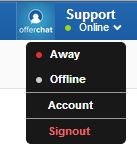
Green means you’re online. Click the status indicator to toggle your status to away (during breaks) or offline. You can always see menus to account settings of to signout from your account.

Note: Your status in the dashboard will reflect in the live chat widget on your site. If you’re away or offline, visitors won’t be queued to you. If there are no other agents available, the widget will automatically switch to an offline form.

You’ve got chats!

The Notifications icon is also located on the global navigation bar at the top. It’s found on the left, next to the Home icon.

Websites in your plate

Account owners and administrators will see all websites added to the account in a list below the Offerchat logo in the dashboard. Live chat agents or operators on the other hand will see just the websites assigned to them, that is, websites whose visitors can engage in chat with them.

Live chat for websites

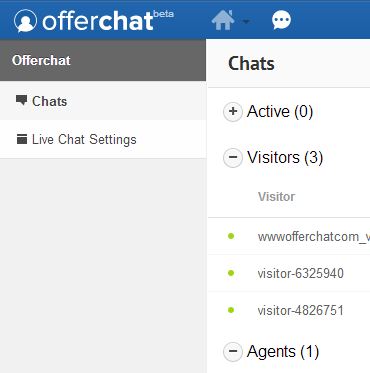
When a website is grayed out, like the one on the screenshot above, it means the site is selected. Clicking a website will switch the dashboard view to the chat interface. Here you can monitor active visitors (currently engaging in a chat with you), site visitors, and other agents available. The notification icon still stays at the top and will display a red bubble with the number of new chat messages received and unread.

Getting to Know the Active Chat Window

Click any visitor to change the screen to an individual chat window where you can chat one-to-one with that visitor. This view is the active chat window. Here you will see various chat functions.

Top bar holds information

At the top of the screen, just below the blue bar, is information pertaining to the visitor such as the visitor label or name, location, and browser being used at the top. Click “more info” right next to the browser icons and you’ll see the page in the website the visitor is on, the chat timer and the visitor’s IP address.

Use the Transfer chat button to transfer the customer, along with the entire chat session, to another agent available who can better assist the customer.

Tip: You can change the generic “visitor-xxxx” label provided by the system to the visitor’s real name. Just hover your mouse above it and as soon as the pointer changes into a hand, click the label. You can then edit and type the visitor’s real name. Click the checkmark right beside it to save the information. The system will remember this visitor as the name you saved and displays that name when that person returns to your site so that you can immediately recognize a returning customer instead of just a random visitor number.

Visitor info on active window

Every time a chat session is done, click X across the Transfer chat button at the top to properly end the chat and stop the chat timer.

The center stage where all the action happens

At the center is displayed the chat conversation happening. Below that, where it says “Enter your message” is the reply box. This is the focus part of the active chat window where interaction happens.

At the right of the screen is the Saved Responses portion. Click a saved response and the reply box will be automatically filled out, ready to be sent. It saves you a lot of time especially for frequently asked questions and giving opening and closing greetings. You can save a new response from this window or search for a particular response using a keyword.

How did it go?

Tell us about your chat experience using Offerchat live chat and the new dashboard. For questions and requests for support, click the intercom button represented by the ? button in the bottom right of your dashboard screen. Or you can email [email protected] or chat with us through the website. You can also browse the Knowledge Base for ready answers and solutions. We always encourage new users to get the most out of Offerchat!

Beta time is crunch time for us in making the online chat tool better and stronger so don’t hesitate with giving us your thoughts on the tool. Happy chatting! We hope that Offerchat will be your partner in building a solid relationship with your customers.

Published by

Cheby Labrague
Cheby Labrague

Cheby writes about live chat insights, improving conversions, epic customer service, online marketing and everything in between. She will take you by the hand in exploring how to extend your website's earning power through Offerchat's smart live chat tool, and even smarter live chat people.

Related Posts

If you enjoyed this topic, you might also like:


Touchdown at Self-Service Portal, Where Answers are Waiting

One of the fast evolving trends in online customer service is customer self-service made possible through a self-service portal where consumers can skip the conventional touchpoints of support and go straight to getting the answers they need right after hit “Enter”, that is, sans wait times.

FAQ on Steroids

A web self-service portal is like the FAQ section on steroids. It’s more organized than a linear, one-paged FAQ section on your site, and it’s packed with all known answers, guides and other relevant support documentation that can help consumers all throughout the pre-sales, post-sales and customer usage timeline.

In fact, customer self-service portals have evolved into a different kind of online customer support altogether and have acquired multi-faceted functions and features. But at its core, a web self-service provides a means for consumers to gather information and support they need from a brand or a business by themselves.

Offerchat Knowledge Base Now Available!

Enable customers to help themselves

That said, drop by the Offerchat Customer Support Knowledge base, a web self-service portal for live chat app users with a knack for DIY feats and extremely intolerant of support wait times.

Currently, the Knowledge base is very straightforward. Information and step-by-step guides are grouped in 6 major categories. To quickly find the answer you’re looking for, use the Search feature.

For bug reports, please email us or use the intercom in the dashboard when you login to your account. Please do the same if you want to us to feature a particular Q and A you think should be included in the Knowledge base. We’re continually updating and adding information to this web help center. With your feedback and additions, we can grow this online support reservoir for other users who might need help.

Published by

Cheby Labrague
Cheby Labrague

Cheby writes about live chat insights, improving conversions, epic customer service, online marketing and everything in between. She will take you by the hand in exploring how to extend your website's earning power through Offerchat's smart live chat tool, and even smarter live chat people.

Related Posts

If you enjoyed this topic, you might also like:

Lenten Season 2013: Support to Pause for a Break

The Offerchat team will take a much needed break on March 28 and 29 in observance of Maundy Thursday and Good Friday. Office hours will resume on April 1, Monday (Phil Time GMT+8). Replies to your inquiries and requests for support from the team might be delayed.

Please note, however, that the four-day break will not affect the live chat service. You can still use Offerchat on your websites.

This Lenten Season 2013 is a good opportunity for us to pause and reflect on all the aspects of our lives. We invite you to take the time to reflect, spend meaningful time with family and friends, and feel blessed.

seed

Have a blessed Holy Week! See you on Monday.

Published by

Cheby Labrague
Cheby Labrague

Cheby writes about live chat insights, improving conversions, epic customer service, online marketing and everything in between. She will take you by the hand in exploring how to extend your website's earning power through Offerchat's smart live chat tool, and even smarter live chat people.

Related Posts

If you enjoyed this topic, you might also like: