What is Live Chat? And Other Questions Nobody Wants to Be Caught Asking
We took to the thinking chair and put on our philosopher’s hats to ponder one of the universe’s most obvious questions everybody doesn’t want to be caught asking — What is Live Chat?
So if you’re wondering what’s up with this latest trend in websites, how it works and what does it look like. . . If you don’t want to ask “stupid” questions for fear of being perceived as dense, then go right ahead and arm yourself with this knowledge.
Quick jump to a topic by clicking a link below:
What is Live Chat?
To put it uber-simply, live chat is a tool, app or widget that allows you to chat directly to somebody from the website. This can be the website owner, or a member of the customer service team.
So let’s just say, somebody really missed his AOL days and decided to bring chat back right in his front yard. Seriously.
Live chat is becoming ever-present in websites that sell products or services — that is, websites that are actually online businesses. It is the primary tool for live chat support or online customer service.
What does it look like?
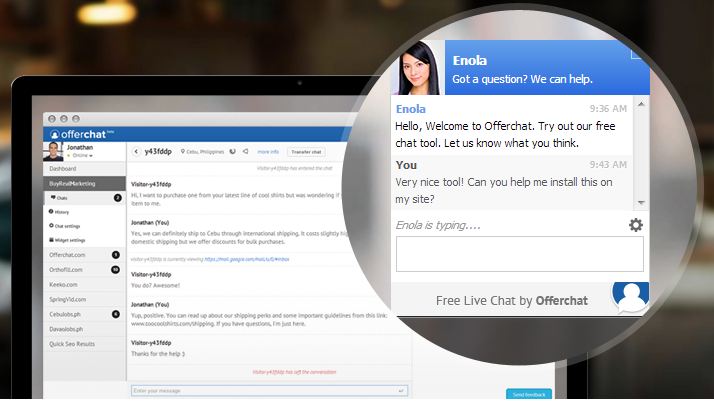
(Background: Offerchat live chat control panel accessed by a website owner. In circle: How the live chat widget appears on your site as seen by visitors.)
Live chat is becoming ever-present in websites that sell products or services — that is, websites that are actually online businesses. It is the primary tool for live chat support or live chat customer service.
Who uses live chat?
- Big companies and corporations
- Non-profit organizations
- Blogs
But it’s best for:
- Small business websites
- Online Stores / eCommerce sites
Basically, any website who want or need to provide an instant messaging platform to its audience or site visitors as an online customer service touch point.
How does it work?
Most live chat programs today need only to be embedded on a website by inserting a line of code to a website’s HTML header or body. Some providers make website specific plugins to make the installation easier. For example: WordPress live chat plugin, Prestashop live chat module.
The unique code is given after registration and should be added to a single website only for customization purposes. Should you want to add a chat widget to another site, add another site from the live chat dashboard and you will be given another widget code.
Once the code is added to a website, the chat widget will immediately appear. By default, the widget will be minimized to avoid getting in the way of visitors viewing your site.

(Example website with an Offerchat live chat widget expanded showing an ongoing chat conversation.)
Customization options to change the widget’s appearance and color, as well as labels and language used are available by accessing the control panel or dashboard. This is done by logging into your live chat provider’s website.
As soon as you log in to your account and access the dashboard, the chat widget on your website will appear as online, signaling your visitors that you are available. When a visitor on a page of your site clicks the widget to expand and chats with you, the chat message will appear in the chat view on your dashboard along with some notifications (ticker flashes on your browser tab along with a sound alert) to let you know that a visitor is chatting.
Skip the Textbook, I’m no Dinosaur
Watch the explainer video to wrap your head around live chat and how it can help you get more product users:
Published by

Cheby writes about live chat insights, improving conversions, epic customer service, online marketing and everything in between. She will take you by the hand in exploring how to extend your website's earning power through Offerchat's smart live chat tool, and even smarter live chat people.