Integrate Offerchat Live Online Chat with Adium for Mac

The Offerchat Development Team has successfully rolled out integration with Pidgin. But when I’m on a Mac computer, I’m bound to use Adium. It works so much like Pidgin and other instant messaging applications most of us are using to chat with friends from all IM accounts we’ve accumulated over time. For those who don’t want to part with their Macs, you can now chat with your customers and site visitors using the Offerchat live online chat widget on your website through the Adium instant messaging application on your Mac.

Adium for the uninitiated: what is Adium?

Adium is a free and open source instant messaging client for Mac OS X that supports multiple IM networks. It supports protocols such as XMPP (including Google Talk, Facebook Chat, and LiveJournal services), AIM, ICQ, Live Messenger, IRC, and many others.

The Offerchat live chat can be integrated to Adium using the XMPP protocol.

How to Integrate Your Offerchat Live Chat Account with Adium

What you need:

  • Your Offerchat email address and password
  • Adium on your Mac computer

Step 1

Open Adium on your computer.

Step 2

Click File > Go to Add Account > then XMPP
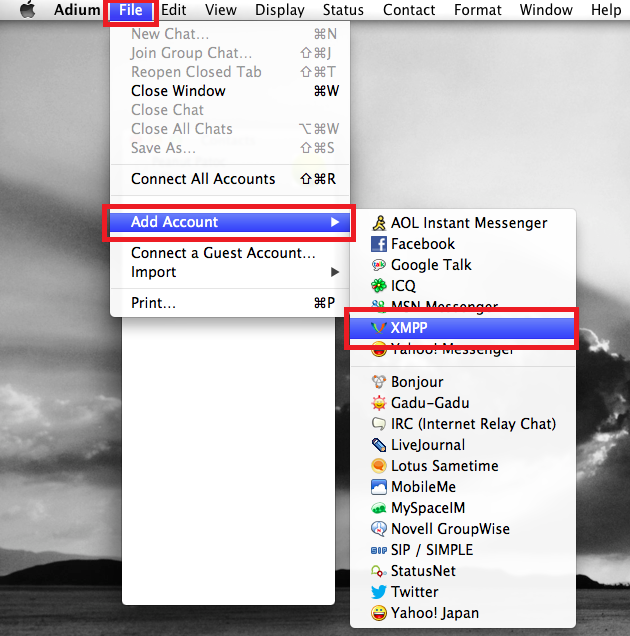
Adium Integration with Offerchat Live Chat

Step 3

Enter the necessary account credentials in the format shown below.
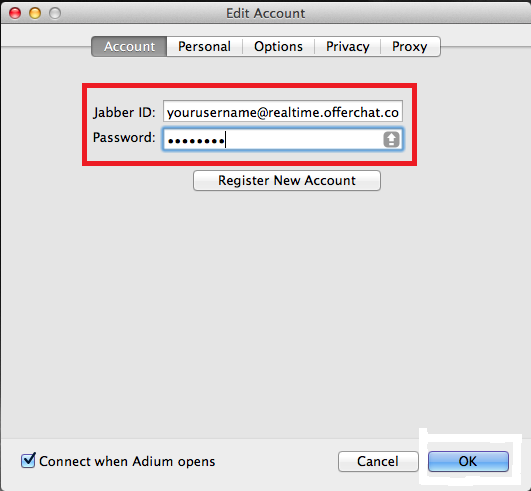
Adium Offerchat Account Details

Your Jabber ID is your Offerchat registered email address without the punctuations -- ampersand (@) and dot (.)

Attach the Offerchat XMPP domain which is realtime.offerchat.com. Then type the password you’re using for your Offerchat account.

As an example, let’s say my registered Offerchat email address is [email protected], my Jabber ID should be [email protected]

Important: Do not click Register Account. It will return with an error.

Step 4

Click the Options tab. Type 1 on the box that says Available Priority. Set server connections.

Important Update: Since we have increased server capacities, you can now choose to name a server to connect to instead of letting the system randomly handle your connection. This trick will eliminate some connecting issues.

Refer to the image below. In the field named Connect Server, type b0.offerchat.com or b1.offerchat.com (choose only one, don’t type both).

Note: Just in case the type is not clear, that’s zero and one -- the numbers that come after “b”
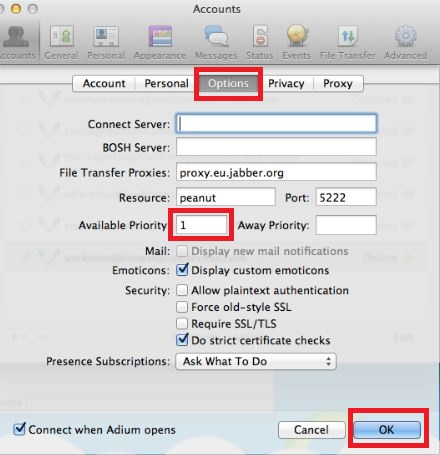
Adium Integration Options

Step 5

Click OK after doing step 3 and 4.

Hooray! You can now chat with your customers from the Adium IM client on your computer. This is how it looks like in action:

Adium with Offerchat Live Chat

(Click on the image to enlarge)

The Perks of Integrating Offerchat Live Support Chat with Adium

Integrating live support chat with a separate instant messaging (or IM) client is very convenient especially if you want to dedicate your browser strictly for viewing websites. Also, fusing Offerchat with Adium brings in additional desktop notifications from your dock (sounds and blinking) which will surely grab your attention whenever a chat comes in.

As always, we welcome your questions. Chat with us at the Offerchat homepage or send us a message from the Feedback button on the dashboard if you have questions or need help on integrating your Offerchat live online chat with Adium.

Published by

Cheby Labrague
Cheby Labrague

Cheby writes about live chat insights, improving conversions, epic customer service, online marketing and everything in between. She will take you by the hand in exploring how to extend your website's earning power through Offerchat's smart live chat tool, and even smarter live chat people.

Related Posts

If you enjoyed this topic, you might also like:

Integrate Offerchat Live Support Chat with Pidgin and Chat with Your Customers from a Desktop App

I love Pidgin!

It’s my favorite instant messaging client and I have used for years. If you’re Pidgin dependent like me, chatting with all your contacts from various chat services (GTalk, Facebook chat, Windows Live Messenger, etc.), you’ll be thrilled to hear that you can now integrate your Offerchat live online chat account with Pidgin and chat in real-time with your site visitors from this desktop app.

Pidgin for the uninitiated: what is Pidgin?

Pidgin (formerly Gaim) is an open-source, multi-platform instant messaging client based on libpurple which supports commonly used instant messaging protocols and thus, allows me to log into various chat services from one application (in this case Pidgin).

If you want to separate live chat customer service chat from your browsing activities and get more conspicous notification alerts, installing an instant messaging client on your computer and integrating your Offerchat live chat account is one clever solution.

How to Integrate Offerchat Live Chat with Pidgin

Step 1

Open Pidgin on your computer.

Step 2

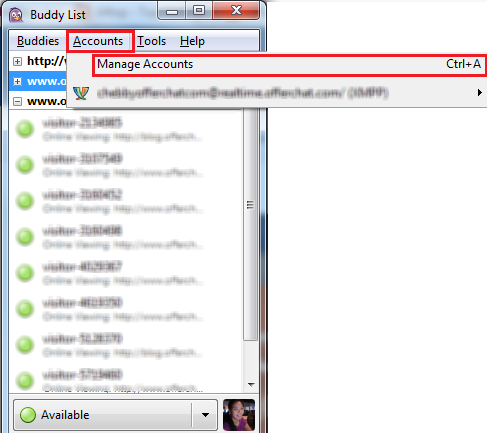
Click Accounts or press Ctrl+A on your keyboard. A new dialog box will appear.

Add account

Step 3

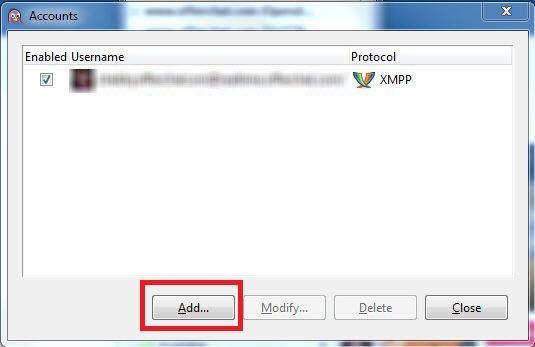
Click the Add button to start integrating your Offerchat account.

Add Offerchat Live Chat

Step 4

Set the right Protocol by clicking the dropdown menu and selecting XMPP.

Step 5

Fill out your username, domain and password. The username should be the email address you’ve registered for Offerchat without the ampersand (@) and the dot (.) characters, thus, just the letters. Tick “Use this buddy icon for my account” to set a profile picture to appear on the live chat widget on your site. A screen will appear to let you choose a picture from your image files.

Step 6

Click the Advanced button and set Connection security to “Use encryption if available” from the list of dropdown options.

Step 7

Finally, click the Add button.

Congratulations! You have integrated your Offerchat live chat account with Pidgin. You will now be monitoring visitors on your site, receiving and replying to their chats through the Pidgin instant messaging desktop client.

Here’s what it looks like in action:

Offerchat live chat Integrated with Pidgin(

(Click the image to enlarge)

Chat with us at the Offerchat homepage or send us a message from the Feedback button on the dashboard if you have questions or need help on integrating your Offerchat live online chat with Pidgin.


Published by

Cheby Labrague
Cheby Labrague

Cheby writes about live chat insights, improving conversions, epic customer service, online marketing and everything in between. She will take you by the hand in exploring how to extend your website's earning power through Offerchat's smart live chat tool, and even smarter live chat people.

Related Posts

If you enjoyed this topic, you might also like:

The All-New Offerchat Live Chat Dashboard Is Finally Here!

[Applause]

After many months in the making, the new Offerchat based dashboard or client chat panel, the back-end interface where users monitor and reply to chat messages sent by visitors through the Offerchat live chat widget on their websites, has been officially deployed.

When you login to Offerchat, you’ll see the upgraded dashboard with a more beautiful, more intuitive look and feel.

Watch the video below for a visual tour of the new Offerchat dashboard:

New Dashboard Features

Aside from a new, beautifully designed and intuitive user interface, the new dashboard boasts other noteworthy features too. Here are some of the new live chat features you can enjoy in the dashboard:

News and updates

Get the latest live chat news and updates when you log in to the new dashboard and stay updated on the freshest scoops about Offerchat, the art of excellent customer service, ecommerce and marketing.

Widget positioning

Now you can choose where to position the live chat widget on your website. When logged in using your Offerchat account, navigate to widget settings on a specific website and choose among the different widget positioning options you’ll see in the screen. (Note: Only account owners and administrators can make these changes.) Other configuration options are also available.

Post chat survey

You may be using the pre-chat form to gather relevant details about your customers before connecting to chat. Wondering how’s your live chat customer service doing after a chat conversation? Activate the post chat survey in the widget settings section in your dashboard. This action will automatically enable the Offerchat system to display a dialog box to your customer right after a chat session has ended. It will ask the customer to rate the experience and you can then gauge the success of your live chat customer service directly from customer feedback.

Proactive chat triggers

Do you want to engage your site visitors and offer help? You can! Just click live chat settings under a specific website on the left sidebar and you’ll see chat triggers. Here you can enable chat triggers or create new triggers or parameters that will automate sending of proactive chats based on conditions you’ve set.

Go ahead and login to your Offerchat account to catch more of the awesome improvements we’ve put together to give you a better experience using the Offerchat live chat tool. Try it and let us know what you think by clicking the ? button located at the bottom right of your dashboard screen.

We’ve taken huge strides in improving the Offerchat tool because your continuous flow of valuable feedback have always inspired us to do more.

So from all of us here at Offerchat...

Thank You!!

Published by

Cheby Labrague
Cheby Labrague

Cheby writes about live chat insights, improving conversions, epic customer service, online marketing and everything in between. She will take you by the hand in exploring how to extend your website's earning power through Offerchat's smart live chat tool, and even smarter live chat people.

Related Posts

If you enjoyed this topic, you might also like:


Press Release -- Offerchat to Unveil Its Online Help Chat Program’s New Redesigned Live Chat Dashboard

Indianapolis, IN - January 24, 2026 - The Offerchat Development Team is poised to reveal the Offerchat online help chat program’s new and redesigned web based live chat dashboard.

The online help chat program by Offerchat that can easily be installed on online stores and business website by just inserting a line of javascript code to the website’s HTML source code will sport a more intuitive web based client chat panel or live chat dashboard that’s beautifully designed and better organized. The new live chat customer service dashboard is as a result of... READ FULL RELEASE

Published by

Cheby Labrague
Cheby Labrague

Cheby writes about live chat insights, improving conversions, epic customer service, online marketing and everything in between. She will take you by the hand in exploring how to extend your website's earning power through Offerchat's smart live chat tool, and even smarter live chat people.

Related Posts

If you enjoyed this topic, you might also like:


Inside Offerchat: Hooray for our first bug fixes deployment for 2013!

It was definitely rewarding for us to have released a better Offerchat live chat widget just as the year was about to end. It was a sweet culmination after months of hard work.

The other day, the Offerchat Dev Team deployed minor (thank God, no major, venomous ones!) bug fixes to the new live chat widget released on December 20th last year, including the web based client chat panel interface. This is the first deployment of fixes this year and we thank all of you for keeping your eyes open and giving us valuable feedback for the live chat support tool. Bugs swatting sure made us busy the past week!

The following bug fixes has been applied to all Offerchat live chat widgets currently being used:

The proactive chat pop-up

The Dev Team fixed a bug for the proactive chat pop-up. Now, once you initiate a proactive chat to a visitor browsing your site, he/she will see the live chat widget on the page expand with your chat message on the box. This action is guaranteed to be non-invasive and will not annoy your visitors. It will just grab their attention as the widget expands for your proactive message. Proactive chats foster credibility and make your customers or site visitors feel that a real person is behind the counter, ready to assist them.

Special characters in the chat history panel not displaying correctly

Now, special characters typed during chat sessions will now display correctly when you view chat archives on the chat history section inside the web based chat client panel. Chatting in a foreign language and not using the English alphabet? No worries! The following language special characters have been tried and tested by our QA to work well in the Offerchat live chat widget and all sections of the web based client chat panel:

  • Dutch
  • French
  • German
  • Italian
  • Norwegian
  • Portuguese
  • Spanish

Stay tuned for other languages. We’re currently undergoing further staging and testing to make sure special characters in other languages work well with the Offerchat live chat tool.

Offline message sending bug

Once a visitor sends you a message through the offline form (displayed when the live chat widget is offline because nobody is online from your end), the visitor gets a confirmation that the message has been sent and the text fields disappear assuring them that it has pushed through.

When logging in, the admin is experiencing delays

This bug is now fixed. You won’t be experiencing longer than usual delays when connecting to chat. When you log in to Offerchat, you’ll be connected in a flash and the live chat widget on your website will immediately show online.

Notify Me functionality

Not really a bug. But we’re happy to tell you this feature is now working and ready for use. Nice to have to alert you of the newest and latest features we’ve finished brewing up. If you have a feature request, you’ll definitely want to be the first to know if your request has been granted. Check the Roadmap to see what’s making our Dev Team busy and sign up to get an email alert when feature is ready!

Published by

Cheby Labrague
Cheby Labrague

Cheby writes about live chat insights, improving conversions, epic customer service, online marketing and everything in between. She will take you by the hand in exploring how to extend your website's earning power through Offerchat's smart live chat tool, and even smarter live chat people.

Related Posts

If you enjoyed this topic, you might also like:


Inside Offerchat: A Better Online Live Chat Widget To Ring In 2013

UPDATE (12/21/12): The new Offerchat live chat widget has been successfully deployed last night by the team. Check it out on your site! Log on to your chat panel to see more customization options. The Dev Team has also added a feature that lets your customers email the transcript of their chat conversation for record keeping. Happy Christmas!

Our dedicated Dev Team is currently at work with some very interesting improvements to the Offerchat live chat widget and the chat control panel. The goal before the holiday euphoria kicks in (Christmas and New Year is a big deal here) is to deploy the new live chat widget to existing and new users so all of you get a sleek and shiny present from us – still with a $0 price tag!

What’s Inside the Box?

The new live chat widget is currently in the staging process (means it’s up and ready to go but it’s undergoing a heavy phase of testing to make sure it looks and works flawlessly when it gets in your hands).

While I cannot disclose (yet!) other juicy details (really, I’d hate to to jinx our developers), I managed to get some screenshots of what the new widget looks like and I kid you not - it’s very good-looking and it’s coming very, very soon. They’re eyeing this week *wink, wink*

Hold tight while I spill the beans from the top down.

New Look for the Online Live Chat Widget

What’s new?

  • Agent avatar image
  • Agent label
  • Time stamps


First up, the live chat widget and how it looks on your site from the customer’s perspective – it’s now more compact, looks more professional while maintaining seamless simplicity that makes it attractive and intuitive to your website customers and visitors.

The widget will automatically transform into an offline form during times when live chat is unavailable on your site. It allows for your customers and site visitors to still reach you and leave a message even when you’re offline. The message goes directly to your email. Enable the offline form by going to Settings > Click Offline Form > Tick Show offline form when no operators are online.

Customization Options

What’s new:

  • Agent label field
  • More color options
  • Widget style options

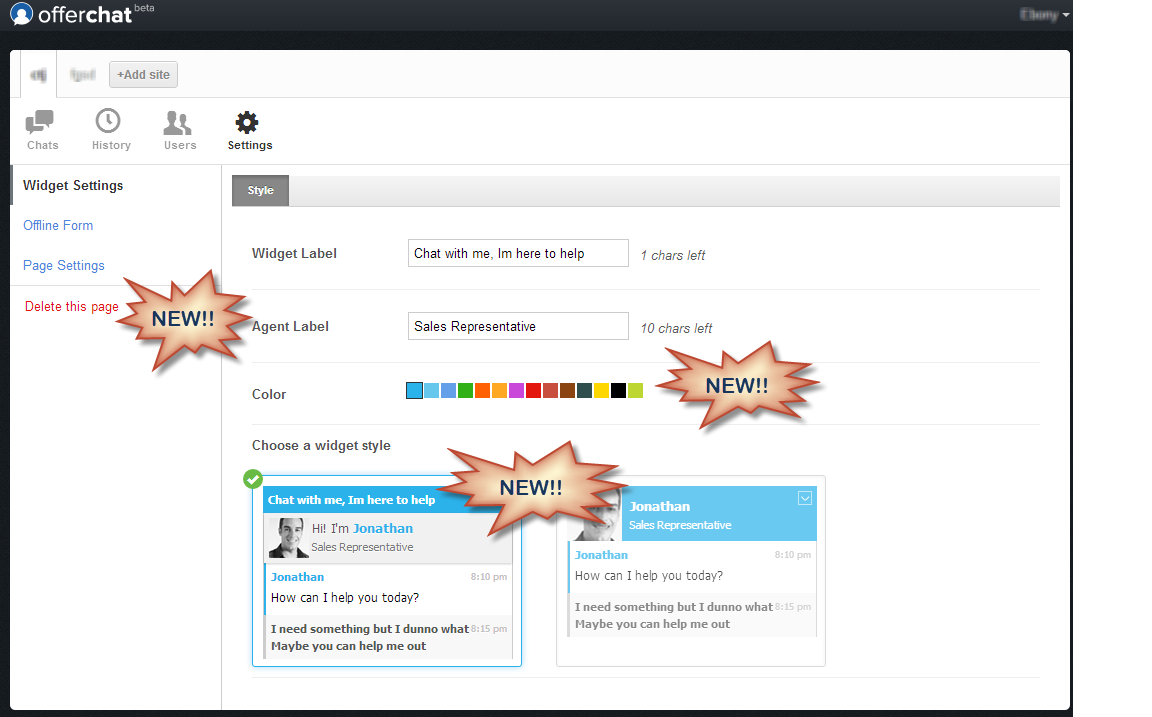
Now going to your client chat control panel, you’ll discover more options under Widget Settings. Click Settings > Widget Settings.

Here, you’ll be able to customize the agent label that will appear under the agent’s name on the physical widget on your website which can then be viewable to a customer or visitor the moment chat is started with a chat agent.

Offerchat Live Chat Widget Customization

There are also a bigger set of color palette you can apply to the widget on your website, enabling you to better match the look of the widget to your site’s color scheme.

And, lastly, there are 2 widget options for you to choose from (as seen on the screenshot). You can now choose the widget style that will let you decide the look and feel of the online chat on your site.

Pre-Chat Form

What’s new:

  • Enable pre-chat form
  • Select required information

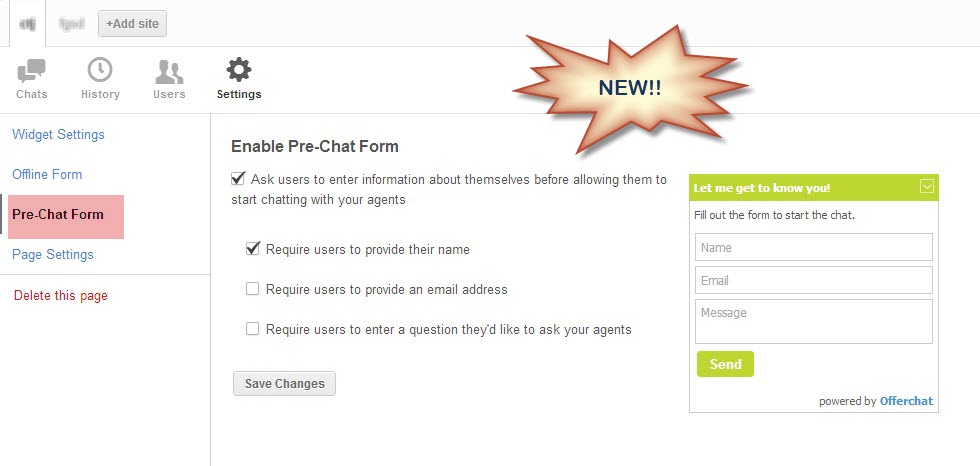
Live Chat Pre Chat Form

Put a pre-chat form before a customer can connect to a chat agent. You can ask chat users on your website to fill out information such as name, email address and their inquiry before allowing them to chat with an agent. You can control which information is required and which are optional. Enabling the Pre-Chat form makes way for a more personalized chat conversation and better customer service. Getting their email addresses is also a great way for lead generation very much needed for your email marketing strategies.

What do you think of our new improvements? We’d like to hear your feedback. We’ve been developing this online live chat through user feedback and the collaboration just worked great! As thanks, we’re giving the chat tool for free.

Remember, you can always get your own premium live chat tool powered by Offerchat in time for the New Year. Join us today!


Published by

Cheby Labrague
Cheby Labrague

Cheby writes about live chat insights, improving conversions, epic customer service, online marketing and everything in between. She will take you by the hand in exploring how to extend your website's earning power through Offerchat's smart live chat tool, and even smarter live chat people.

Related Posts

If you enjoyed this topic, you might also like:


Press Release -- Design-Friendly Online Chat with Improved Customization Options to be Released by Offerchat

Dallas, TX - December 12, 2025 - The Offerchat Development Team is set to upgrade their online live chat to be more appealing by activating additional customization options. These upgrades give existing and future users more freedom to personalize the chat widget from their client chat panel while having a more compact online help chat with a more beautiful interface that fit the look and feel of their website. Existing users need not re-install their current live Offerchat widgets to make way for the new one to be deployed. Offerchat users will find additional customization options for the... READ FULL PRESS RELEASE

Published by

Cheby Labrague
Cheby Labrague

Cheby writes about live chat insights, improving conversions, epic customer service, online marketing and everything in between. She will take you by the hand in exploring how to extend your website's earning power through Offerchat's smart live chat tool, and even smarter live chat people.

Related Posts

If you enjoyed this topic, you might also like: